Trading Tips
How to Set Stop Loss and Take Profit in Forex: A Beginner's Step-by-Step Guide
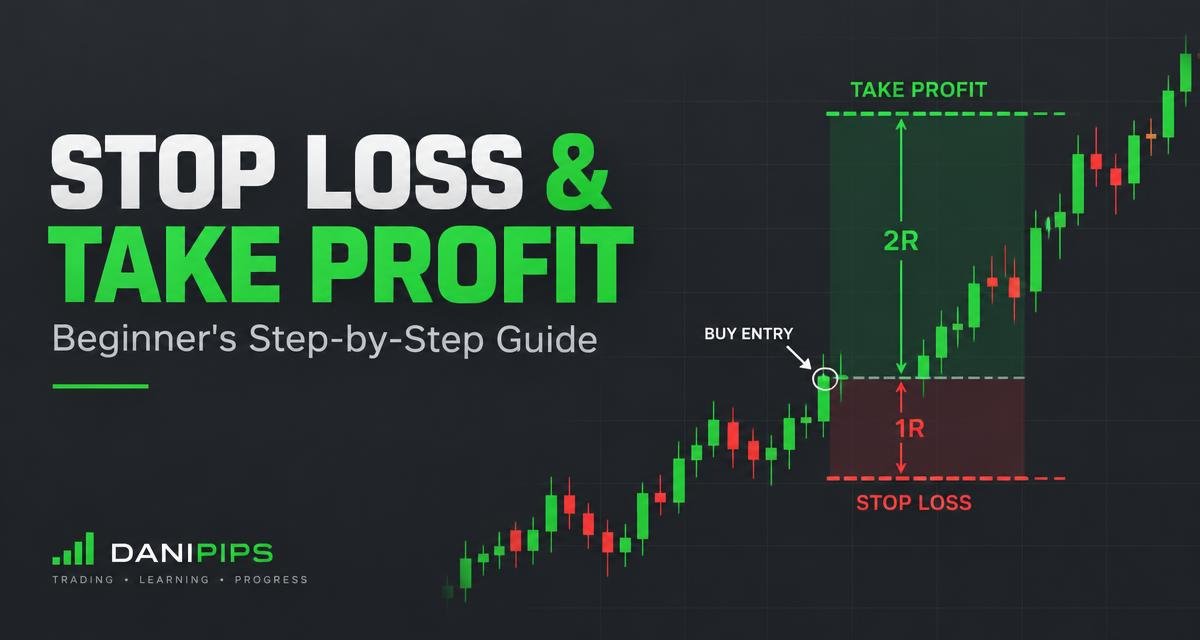
Every professional trader uses a stop loss and a take profit on every trade. Beginners who skip them usually lose their account in a few bad days. This guide shows you exactly how to set stop loss and take profit in forex, where to place them, and how to use a simple risk-to-reward ratio so one losing trade never hurts you badly.
What are stop loss and take profit?
- Stop loss (SL): an order that closes your trade automatically at a set price if the market moves against you. It caps your loss.
- Take profit (TP): an order that closes your trade automatically at a set price when the market moves in your favour. It locks in your gain.
Both work even when you are asleep, offline or busy. That is why they are the base of every risk plan.
Why beginners must always use a stop loss
- Markets can move fast. News like NFP or CPI can move gold or EURUSD dozens of pips in seconds.
- Emotions break plans. Without a fixed exit, most beginners hold losing trades hoping they come back.
- It lets you size correctly. You can only calculate a proper lot size once you know your stop distance. Use the Danipips Lot Size Calculator for this.
Risk-to-reward ratio explained
The risk-to-reward ratio compares how much you can lose (SL distance) with how much you aim to win (TP distance).
| Ratio | Stop loss | Take profit | Win rate needed to break even |
|---|---|---|---|
| 1:1 | 20 pips | 20 pips | 50% |
| 1:2 | 20 pips | 40 pips | about 34% |
| 1:3 | 20 pips | 60 pips | 25% |
With a 1:2 ratio, you can be wrong more often than right and still not lose money over time (before costs like spread). This is why many traders target at least 1:2.
3 practical ways to place your stop loss
### 1. Beyond support or resistance
For a buy, place the SL a few pips below the nearest support. For a sell, place it a few pips above the nearest resistance. If price breaks that level, your trade idea is wrong anyway.
### 2. Beyond the last swing high or low
In a trend, put the SL just past the most recent swing low (buy) or swing high (sell). This gives the trade room to breathe.
### 3. Based on volatility
Gold (XAUUSD) moves much more than EURUSD. A 10-pip stop that works on EURUSD may be hit by normal noise on gold. Look at recent candle ranges or the ATR indicator and keep your stop outside normal movement.
Where to place take profit
- At the next resistance (for buys) or next support (for sells).
- At a fixed multiple of your stop, such as 2x or 3x the SL distance.
- Some traders close half at 1:1 and let the rest run to the next level.
Example: EURUSD buy
- Entry: 1.0850
- Support below: 1.0830 → SL at 1.0825 (25 pips)
- Target 1:2 → TP at 1.0900 (50 pips)
- Account $500, risk 1% = $5. With a 25-pip stop, the lot size is about 0.02 lots (about $0.10 per pip per 0.01 lot on EURUSD).
Example: Gold (XAUUSD) sell
- Entry below a resistance zone.
- SL a little above the resistance, outside the recent candle wicks.
- TP at the next support, at least twice the SL distance.
- Always check your broker's contract size for gold before calculating your lot, because pip value differs from forex pairs.
These are educational examples, not trade signals.
3 common stop loss mistakes
- Moving the stop further away when price gets close. This turns a small loss into a big one.
- Stops that are too tight. Normal spread and noise close the trade before your idea plays out.
- Trading without any stop. One surprise news event can wipe out weeks of gains.
How to set SL and TP in your trading app
In MetaTrader or the Exness Terminal, open a new order and fill in the Stop Loss and Take Profit fields before you click Buy or Sell. You can also drag the lines on the chart after opening the trade. Practise this first on a demo account.
Start practising
Learn more in the Danipips Trading Academy, read our guide on forex leverage, and see how to start with a small account. Have a question? Ask the AI Tutor.
Ready to practise with a demo or live account? Open an account with Exness, our recommended broker: Open an Exness account.
Risk warning: Trading forex and CFDs involves high risk and you can lose money. Only trade money you can afford to lose.